
Your contracts probably live in too many places right now. One version sits in email, another in a shared drive, someone saved a redlined PDF to a desktop, and the signed copy is buried in a folder no one can find quickly. When renewal dates, approval steps, and key obligations depend on that kind of setup, errors aren't random. They're built into the process.
Contract management works best when every stage is controlled. Creation, review, approval, signature, storage, tracking, and renewal all need a clear system. If even one stage stays manual and messy, the rest slows down with it.
That's where disciplined process and the right document tools matter. Many teams don't need a heavy enterprise rollout to fix the basics. They need practical habits, cleaner files, searchable documents, consistent templates, and browser-based tools that remove friction instead of adding more software.
Mastering the Contract Management Lifecycle means reducing delays, eliminating version chaos, and making every agreement easier to act on after signature. This article walks you through 10 proven best practices for contract management and shows how PDFBirds tools streamline each stage, from creation to compliance.
Table of Contents
- 1. Centralize Contract Storage and Management Systems
- 2. Establish Clear Contract Approval and Sign-Off Workflows
- 3. Implement Contract Abstraction and Key Term Extraction
- 4. Establish Contract Renewal and Expiration Tracking Systems
- 5. Create Standardized Contract Templates and Language Libraries
- 6. Implement Obligation and Liability Management Tracking
- 7. Establish Contract Risk Assessment and Scoring Frameworks
- 8. Develop Contract Naming Conventions and Classification Systems
- 9. Implement Contract Clause Libraries and Redline Tracking Systems
- 10. Create Compliance and Regulatory Requirement Monitoring Systems
- Contract Management Best Practices, 10-Point Comparison
- Take Control of Your Contract Workflow Today
1. Centralize Contract Storage and Management Systems
An audit starts at 9:00 a.m. By 9:12, legal has one version, procurement has another, and the signed amendment is sitting in someone's inbox. That is what poor contract storage looks like in practice. It slows reviews, creates version disputes, and forces teams to make decisions from incomplete records.
Centralization fixes that. Put every active contract record in one controlled repository, with the current agreement, signature pages, amendments, exhibits, and supporting documents stored together. If people have to search across email, shared drives, and personal folders, you do not have a contract management system. You have scattered files.
Build a single source of truth
Set the structure before you migrate anything. Decide how contracts will be grouped, who owns each record, and what documents belong in the official file. Analysts at World Commerce & Contracting note that poor contracting practices drain business value across the contract lifecycle, which is exactly why storage discipline deserves executive attention, not clerical treatment. Contract records should be complete, current, and easy to retrieve.
PDFBirds is useful here because contract files rarely arrive in a clean, archive-ready package. A real estate team might receive a lease, rider, amendment, and signature packet as separate PDFs from different parties. Use the Merge PDF tool from PDFBirds to combine them into one master record, then split out oversized appendices or compress large files before upload if your repository has file-size limits.
Practical rule: Store the executed agreement and every active amendment in the same record. One contract should produce one reliable file set.
This method works across departments. Healthcare teams can group vendor agreements with business associate agreements and renewal paperwork. Procurement teams can assemble master service agreements, statements of work, and signed change orders into one file set. The industry changes. The filing rule should not.
Use these operating rules from day one:
- Create a naming standard: Include date, counterparty, contract type, and status in every file name.
- Assign a contract owner: One person should be responsible for the accuracy and completeness of the record.
- Define the official file set: List the documents that must be stored together for each contract type.
- Audit the repository regularly: Remove obsolete drafts and flag missing signature pages or amendments.
- Back up the repository: Central storage only works if records stay available when systems fail.
2. Establish Clear Contract Approval and Sign-Off Workflows
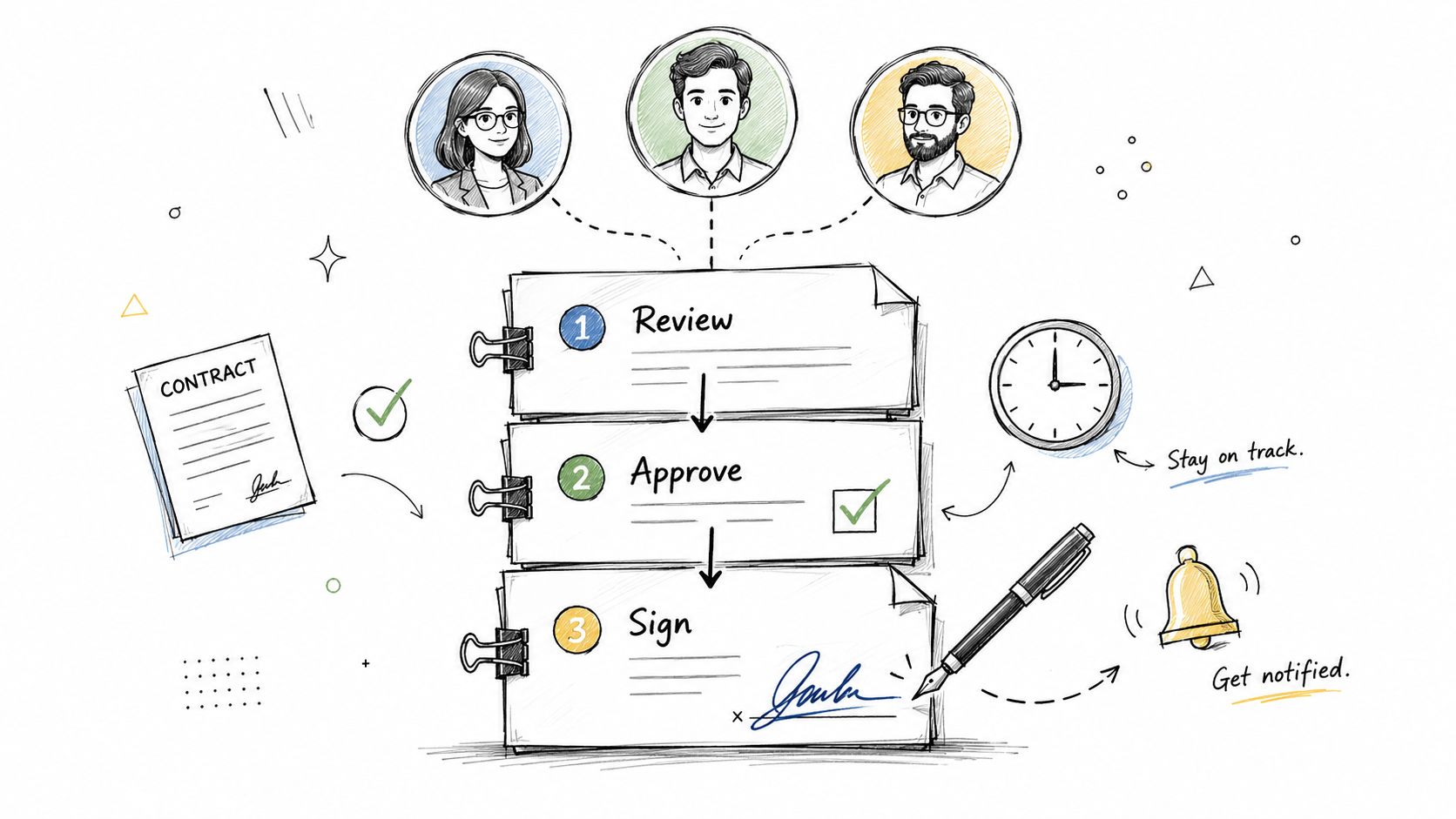
A contract reaches legal on Tuesday, finance on Thursday, and procurement the following week. By then, someone has already sent an outdated draft to the counterparty. That is what a weak approval workflow looks like. The problem is not volume. The problem is undefined routing.
Define who reviews what
Set approval rules before the contract enters review. Do not rely on informal habits such as "legal checks the risky ones." Write the triggers down. Approval should change based on contract type, pricing exceptions, liability edits, data processing terms, security requirements, and signature authority.
The World Commerce & Contracting benchmark on contracting process efficiency has long shown the same pattern. Contract cycle time expands when handoffs are unclear, approvals are duplicated, and review paths depend on email instead of a defined process. The practical takeaway is simple. Fewer ambiguous steps means faster signature.
PDFBirds gives smaller teams a workable browser-based process without forcing them into a full CLM rollout. If a vendor sends a locked PDF, use PDFBirds to add fillable fields, mark signature blocks, and prepare the file for each reviewer in the right order. If one approver only needs the pricing page and liability clause, split the document so they review the relevant pages instead of scrolling through the entire agreement. That cuts delay and cuts careless approvals.
A healthcare operations team might route every BAA through legal and privacy, while a standard office supply agreement only needs procurement approval. A manufacturing team might trigger finance review only when payment terms depart from the approved template. Good workflows are conditional. They are not one-size-fits-all.
Keep signatures inside the workflow
Signature belongs at the end of the approval path, inside the same controlled process. If signing happens in a separate email chain, your audit trail breaks and version control gets sloppy fast.
Use PDFBirds to keep the final PDF in the browser, collect signatures, and complete required fields without sending people into desktop apps or print-scan workarounds. That matters in real operations. A services firm can prepare the final agreement, route it to the delivery lead for scope confirmation, send it to finance for payment approval, and then push the same file to the signer. One file. One sequence. No side copies.
Use this walkthrough as a training asset for your team:
Build your workflow around these rules:
- Assign review triggers: Define which contract terms or deal conditions require legal, finance, security, procurement, or executive sign-off.
- Set review order: Decide the sequence upfront so contracts do not bounce between teams.
- Prepare signer-ready PDFs in PDFBirds: Add fields, clean up pages, and lock the final version before signature routing starts.
- Set response deadlines: Every approver should have a clear turnaround target.
- Create escalation rules: If an approver misses the deadline, the contract owner should know exactly who steps in.
- Track delay points: Identify where drafts sit longest, then fix that handoff first.
A clear approval workflow does two things well. It speeds up routine contracts, and it slows down the right exceptions. That is the standard to aim for.
3. Implement Contract Abstraction and Key Term Extraction
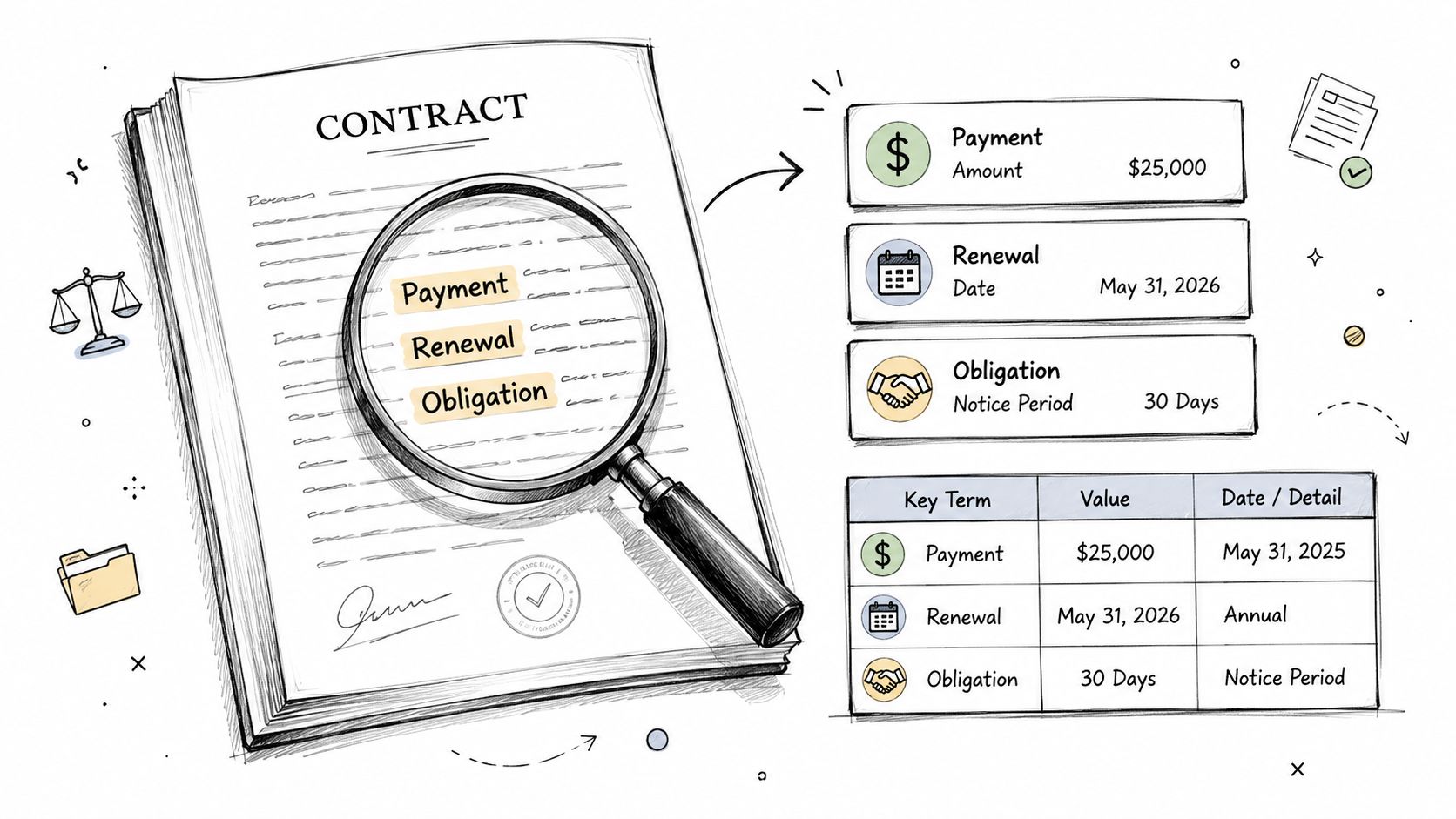
A signed contract isn't useful if the key terms stay trapped inside a dense PDF. Teams need a fast way to pull out payment terms, renewal clauses, notice periods, liability caps, service levels, and termination rights.
That process is contract abstraction. Done well, it turns static documents into usable business data.
Capture the minimum metadata that matters
If you want contract visibility without burdening the team with endless fields, start with the minimum viable metadata set. The essential eight fields are counterparty, contract type, owner, status, start date, end date, renewal terms, and notice deadline, as outlined in ContractSafe's guide to managing contracts.
That list is practical because it supports the three most common needs. Find the contract fast, avoid missed renewals, and report risk.
PDFBirds is useful when the contract arrives as a non-editable PDF. A procurement team can use PDF to Word for clause review and PDF to Excel for extracting dates, payment schedules, or comparison fields into a working spreadsheet. Insurance and legal operations teams often do this when comparing policy terms or tracking renewal language across many agreements.
Pull key terms into a standard summary sheet immediately after signature. Waiting until renewal season guarantees missed details.
A strong abstraction workflow usually includes:
- A standard summary template: Use one format for each contract category.
- Priority by risk or value: Start with high-impact agreements first.
- Human validation: Automated extraction helps, but someone must verify the source language.
- Searchable storage: Save the abstract where operations, legal, and finance can all use it.
This is one of the best practices for contract management because it makes contracts actionable long after legal review ends.
4. Establish Contract Renewal and Expiration Tracking Systems
A contract auto-renews on Friday. Procurement notices on Monday. The team is now locked into another year at the old price, with no chance to renegotiate because the notice window passed.
That failure is avoidable. Renewal tracking works only when your team treats renewal dates, notice deadlines, and decision owners as one system.
The priority is simple. Track the notice deadline first, then the expiration date. If you only track the end date, you will miss the moment when legal or procurement can still act. The Association of Corporate Counsel's contract management resources consistently frame deadline control and process discipline as core parts of effective contract management, and renewal handling is one of the clearest examples.
Build a renewal system people will actually use
Every contract with a renewal clause should have four connected fields in one tracker: contract owner, renewal type, notice date, and final expiration date. Add the required action beside each one. Renew, renegotiate, terminate, or review.
PDFBirds is especially practical when the source contract lives in a locked PDF. Use PDF to Word to pull renewal clauses into an editable review file. Use PDF to Excel when you need a working tracker with end dates, notice periods, pricing review dates, or termination windows across a batch of agreements. Legal operations, procurement, finance, and facilities teams can all use the same browser-based workflow without waiting for a larger CLM rollout.
Set reminders in layers, not as a single last-minute alert:
- Strategic review reminder: Trigger well before the notice period so the business owner can assess usage, spend, and vendor performance.
- Decision deadline reminder: Force a clear recommendation before legal needs to send notice.
- Execution reminder: Confirm that renewal approval, termination notice, or renegotiation outreach happened.
- Record update reminder: Save the final outcome, signed amendment, or correspondence in the contract file.
A software team managing SaaS subscriptions might extract anniversary dates, auto-renewal terms, and price increase language from vendor PDFs, then load that data into an Excel tracker for quarterly review. A property team can use the same method for lease renewals, extension options, and notice periods.
Track the date that requires action, not just the date the contract ends.
Smaller teams should keep this system tight. One shared tracker, one owner per contract, and one review cadence each month is enough to prevent the expensive mistakes. Bindlegal's contract management guide makes the same practical point. Start with centralized records and automated renewal alerts before you add more process.
5. Create Standardized Contract Templates and Language Libraries
A sales manager grabs last quarter's vendor agreement, changes the party names, misses an outdated indemnity clause, and sends it out before legal sees it. That is how avoidable contract risk gets baked into routine work.
Standard templates stop that pattern. They give each team an approved starting point, consistent clause options, and clear limits on what business users can change. World Commerce & Contracting has also pointed to standardization as a practical way to reduce friction and improve contracting consistency across teams.
Standardize the contracts that create the most repetition
Start with the agreements your business issues every week, not the rare edge cases. NDAs, service agreements, order forms, contractor agreements, offer letters, and common vendor contracts should come first.
Keep the library tight.
An HR team should maintain one approved offer letter template with controlled variations by job type. A SaaS company should keep its MSA, DPA, and order form aligned as one package. Procurement should separate low-risk supplier templates from higher-risk forms so reviewers are not rewriting the same fallback language every time.
PDFBirds makes this process usable in a browser-based workflow. Draft in Word, convert the approved version with Word to PDF, and circulate the PDF that people are supposed to use. If someone edits an outdated PDF copy, PDF to Word helps legal pull the text back into the current template, compare language, and replace it with the approved version. Merge PDF helps combine a base agreement with standard exhibits or policy attachments, and Compress PDF keeps large contract packs easy to send and store.
Build each template set around a few hard rules:
- Approved clause language: Mark what users can edit and what requires legal review.
- Template version control: Remove outdated forms fast so old language does not keep resurfacing.
- Role-based template selection: Tell sales, HR, procurement, and operations exactly which form matches which transaction.
- Scheduled review: Recheck template language each year after policy changes, pricing changes, or legal updates.
Clause libraries matter just as much as full templates. Keep fallback positions for payment terms, limitation of liability, termination rights, privacy language, service levels, and dispute resolution in one controlled source. That gives reviewers faster drafting choices and keeps negotiation positions consistent.
The goal is simple. Fewer one-off edits, fewer avoidable redlines, and fewer risky terms slipping through because someone started from the wrong file.
6. Implement Obligation and Liability Management Tracking
A contract isn't finished when it's signed. That's when the essential work begins.
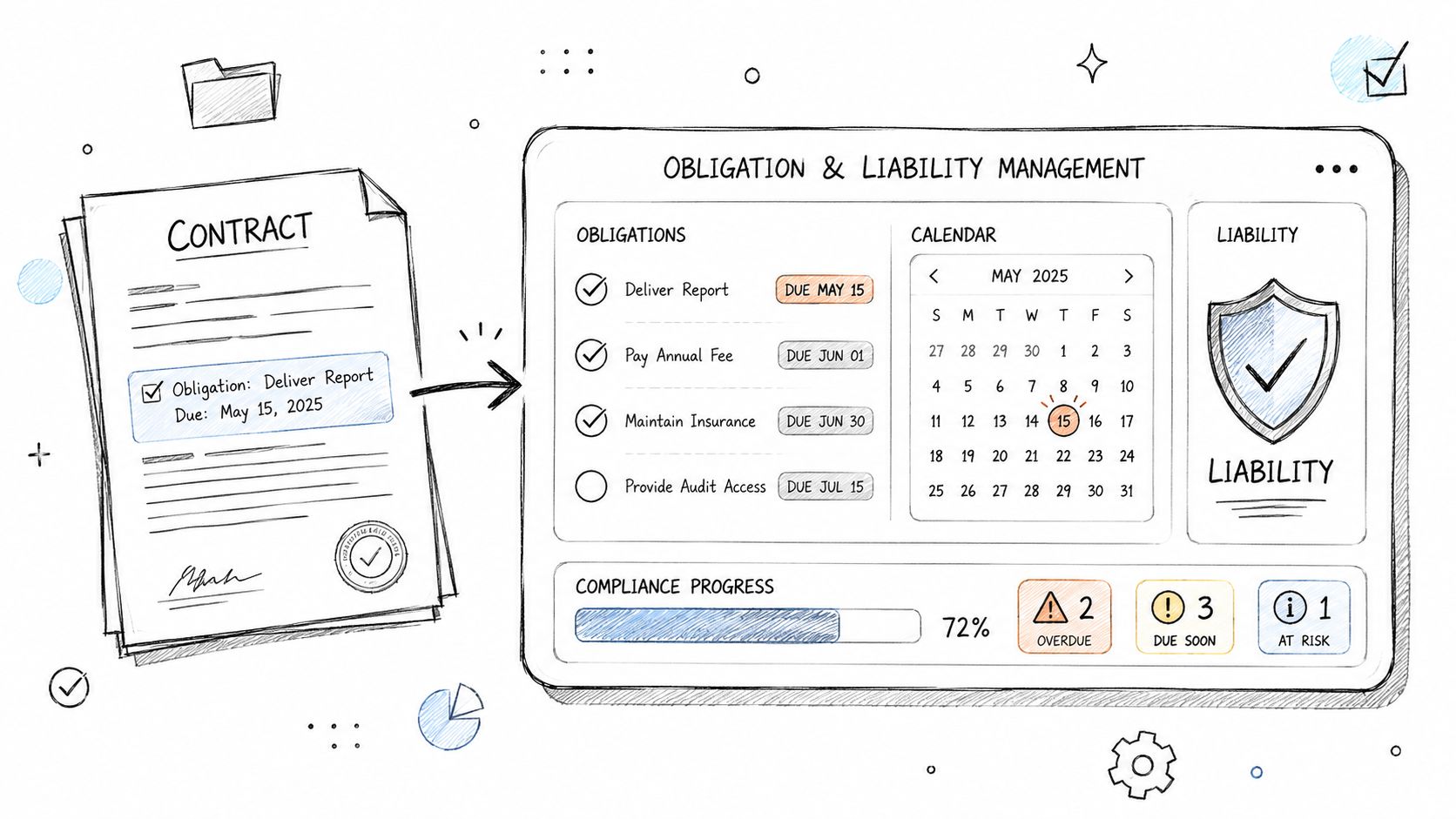
Many teams manage pre-signature steps carefully, then lose visibility after execution. That's where obligations get missed, credits go unclaimed, volume discounts are forgotten, and service issues never trigger contractual remedies.
Track post-signature work, not just signed files
The execution phase is where invisible revenue loss often hides. One underserved industry angle points to 11% of contract value lost during execution due to missed obligations such as unclaimed renewal credits, missed volume discounts, or unbilled scope changes, highlighted in Ironclad's discussion of contract management best practices.
That's why obligation tracking needs owners, dates, and evidence. A manufacturing company should track delivery deadlines, quality commitments, warranty duties, and payment timing. A healthcare system should monitor insurance requirements, vendor certifications, and data handling obligations. A financial services team should track reporting duties and service-level commitments.
PDFBirds helps operational teams work from the document itself. Convert a contract to Word to highlight obligations, then convert relevant terms into Excel for a live tracking sheet shared with operations, finance, or procurement.
Use a simple operating model:
- List every active obligation: Include who owes what, by when, and under what condition.
- Separate liability terms: Track indemnity, insurance, warranties, and caps distinctly.
- Set reminders: Don't rely on memory for milestone performance.
- Review quarterly: Bring contract owners and operations leads together to confirm status.
This practice matters because 70% of contract compliance violations occur because stakeholders are unaware of specific obligations, and centralized searchable repositories with metadata tagging and automated milestone alerts can provide 90%+ visibility into active obligations, as noted in the verified industry benchmarks referenced earlier.
7. Establish Contract Risk Assessment and Scoring Frameworks
A procurement lead approves a supplier contract on Friday. On Monday, legal finds uncapped indemnity, broad audit rights, and data processing terms the business cannot meet. That failure started earlier, when the contract entered review without a scoring method.
Risk scoring fixes that. It gives legal, procurement, and finance a shared way to separate routine agreements from contracts that need tighter review, senior approval, and better records.
Start with a practical scoring model for your team. Score each contract against a short set of factors: contract value, business dependency, data sensitivity, regulatory exposure, counterparty risk, and deviation from approved language. Then tie the result to an action. Low-risk agreements can follow a lighter path. High-risk agreements should require deeper clause review, documented approvals, and clear escalation.
AI review tools can help flag unusual clauses and departures from standard terms, as noted earlier. Keep the judgment with people. Risk scoring is a business decision, not just a text analysis exercise.
PDFBirds is useful at the preparation stage, where many teams lose control. Convert PDF contracts into Word to mark non-standard clauses during review. Convert batches of contracts into Excel so you can compare indemnity terms, liability caps, renewal language, or security clauses across a portfolio. That gives legal operations a working dataset for scoring instead of a folder full of static files.
High-risk contracts need stronger review, stronger approvals, and stronger documentation.
Use a simple framework:
- Define the scoring factors: Keep the list short enough for consistent use.
- Assign point values: Weight the factors that create real exposure for your business.
- Set review rules by score: Link each range to approval authority, clause review depth, and fallback language requirements.
- Record the reason for the score: Future reviewers should see why legal treated the contract as low, medium, or high risk.
- Test the model every year: Update it when your vendor profile, regulations, or revenue model changes.
A weak scoring model wastes legal time on routine paper and misses the contracts that can cause real loss. Build one that is simple, repeatable, and tied to document-level work. PDFBirds helps your team get contract text into editable, comparable formats so the scoring process is based on actual clause review, not guesswork.
8. Develop Contract Naming Conventions and Classification Systems
Search problems usually begin with file names. If one contract is saved as "final.pdf," another as "updated final new.pdf," and the signed version as "contract signed latest.pdf," your repository will fail even if the storage platform is solid.
Naming conventions and classification rules make retrieval possible at scale.
Name files for retrieval, not convenience
A good file name answers the obvious search questions immediately. What is it, who is it with, when was it created or executed, and what status is it in? A format like YYYY-MM-DD_Counterparty_ContractType_Status works because it sorts cleanly and reads clearly.
Then add classification. Tag by type, business unit, owner, geography, risk level, or lifecycle stage depending on how your team searches. Law firms may sort by client, matter, and year. Procurement teams may sort by supplier category and status. Corporate legal teams may sort by business unit and jurisdiction.
PDFBirds helps clean up document sets once the standard is defined. Teams can compress files for easier transfer, merge multi-part contracts into one archive record, and organize records consistently before upload into a repository.
A usable naming system should be:
- Simple enough to apply consistently: If users need a cheat sheet every time, it's too complex.
- Documented in a shared policy: Don't leave the standard informal.
- Applied retroactively to legacy files: Old contracts still need to be discoverable.
- Aligned with metadata fields: File names and repository tags should support each other.
This looks basic, but it's one of the best practices for contract management because it reduces friction across every later task, from audit retrieval to renewal review.
9. Implement Contract Clause Libraries and Redline Tracking Systems
Negotiation breaks down when teams can't tell which version is current, what changed, who proposed it, and whether the change was accepted. That confusion gets expensive fast in enterprise sales, M&A, procurement, and construction contracting.
Clause libraries and redline tracking fix that by bringing consistency to negotiation.
Control negotiation history
Maintain one clean version for each significant stage. Keep a tracked version for edits, a clean version for review, and a final agreed version for execution. If you overwrite previous drafts or scatter redlines across email attachments, you lose the negotiation record.
This matters even more as AI enters review workflows. AI-powered CLM systems deliver 3 to 5x faster contract processing than manual methods, and enterprises using live collaboration, AI-assisted drafting, and predictive alerts report 38% faster closure rates and 52% fewer legal bottlenecks, according to the World Commerce and Contracting report PDF on AI in CLM workflows.
PDFBirds fits the redline stage well for teams that receive contracts in PDF first. Convert PDF to Word for detailed redlining, use Edit PDF for comments or markups when a quick in-browser revision is enough, and merge the final agreement with amendments into one master file for recordkeeping.
A practical setup includes:
- A version naming pattern: Include counterparty, agreement type, version number, author side, and date.
- A clause fallback library: Store approved alternatives for common disputed clauses.
- A negotiation issues log: Record open points and business decisions outside the markup itself.
- A final archive package: Save the executed agreement with approved amendments together.
The strongest negotiation systems don't just accelerate edits. They preserve decision history.
10. Create Compliance and Regulatory Requirement Monitoring Systems
Compliance terms often appear in contracts as ordinary clauses, but they create operational duties that teams must perform. If those clauses stay buried in the document, they won't protect the business.
That's why compliance monitoring has to convert contract language into assigned tasks, reviews, certifications, and evidence.
Make compliance language operational
A financial services firm may need to track sanctions language, reporting duties, and audit rights in vendor contracts. A healthcare organization may need to monitor privacy and security obligations in HIPAA-related agreements. An international business may need to follow data protection requirements in processing agreements.
The first step is extraction. Pull the compliance clauses into a separate working document, highlight owner responsibilities, and define review frequency. PDFBirds supports this well because teams can convert contracts to Word for markup, annotate PDFs directly, and create shareable compliance reference files without relying on desktop software.
There's also a modern workflow issue many teams overlook. Browser-based, no-login document editing is fast and convenient, but it creates a security paradox when teams need both speed and contract integrity. That gap is discussed in Juro's overview of contract management best practices. If your team uses lightweight browser tools for contract edits, set rules for what's allowed, who can use them, and how the final approved version returns to the system of record.
Use this control structure:
- Identify top regulatory themes: Data protection, anti-corruption, export controls, privacy, reporting, and audit rights are common examples.
- Assign ownership by obligation: Legal can interpret terms, but business teams often perform them.
- Create monitoring calendars: Certifications, policy reviews, and notice obligations need schedule control.
- Store evidence of compliance: Keep confirmations, notices, and audit logs with the contract record.
Compliance monitoring works only when the operational team understands the contract language that applies to them.
Contract Management Best Practices, 10-Point Comparison
| Practice | Implementation Complexity 🔄 | Resource Requirements ⚡ | Expected Outcomes 📊 | Ideal Use Cases 💡 | Key Advantages ⭐ |
|---|---|---|---|---|---|
| Centralize Contract Storage and Management Systems | High, platform deployment, integrations, governance | High, migration, storage, admin resources | 📊 Single source of truth, versioning, faster retrieval, audit trails | Large portfolios, regulated industries, dispersed teams | ⭐ Reduces duplicates, improves collaboration and risk visibility |
| Establish Clear Contract Approval and Sign-Off Workflows | Medium, process design and role mapping | Medium, workflow tooling and user training | 📊 Shorter approval cycles, accountability, documented approvals | Multi-stakeholder approvals, high-value vendor/customer contracts | ⭐ Speeds execution and enforces compliance |
| Implement Contract Abstraction and Key Term Extraction | Medium–High, templates, AI models, validation workflows | Medium–High, extraction tools + subject-matter review | 📊 Searchable metadata, rapid term comparison, better risk spotting | Procurement, portfolio analysis, executive summaries | ⭐ Accelerates review and enables data-driven comparisons |
| Establish Contract Renewal and Expiration Tracking Systems | Low–Medium, reminder rules and calendar integration | Low–Medium, tracking tools and owner assignments | 📊 Fewer missed renewals, timely renegotiations, reduced penalties | Leases, subscriptions, maintenance/support contracts | ⭐ Prevents unintended auto-renewals and service gaps |
| Create Standardized Contract Templates and Language Libraries | Medium, template development and approval controls | Medium, legal time to create and maintain templates | 📊 Faster drafting, consistent terms, lower review overhead | High-volume repeatable contracts (HR, SaaS, procurement) | ⭐ Reduces negotiation time and enforces policy |
| Implement Obligation and Liability Management Tracking | Medium–High, extraction to operational systems | Medium–High, integrations with PM/ops and monitoring tools | 📊 Reduced missed obligations, improved compliance and accounting | Supplier delivery, SLAs, regulated service delivery | ⭐ Enables proactive compliance and fewer disputes |
| Establish Contract Risk Assessment and Scoring Frameworks | High, custom models, parameter definition, integration | High, analytics, cross-functional inputs and tools | 📊 Prioritized reviews, clearer portfolio risk visibility | M&A due diligence, financial services, high-exposure contracts | ⭐ Focuses resources on highest-impact contracts |
| Develop Contract Naming Conventions and Classification Systems | Low–Medium, policy design and retrofitting legacy files | Low–Medium, training and batch organization tools | 📊 Improved discoverability, consistent reporting, better retention | Legal archives, procurement, organizations with many files | ⭐ Enhances searchability and analytics accuracy |
| Implement Contract Clause Libraries and Redline Tracking Systems | Medium–High, version control and negotiation workflows | Medium, collaboration tools and library maintenance | 📊 Clear negotiation history, faster resolution of redlines | Complex negotiations, M&A, enterprise MSAs | ⭐ Speeds drafting and provides auditable change history |
| Create Compliance and Regulatory Requirement Monitoring Systems | High, jurisdictional rules, continuous updates | High, compliance expertise and monitoring platforms | 📊 Reduced regulatory breaches, audit readiness, documented controls | Healthcare, finance, multinational operations | ⭐ Mitigates regulatory risk and supports audits |
Take Control of Your Contract Workflow Today
A contract stalls in the final week of the quarter. The signed version is buried in email, the amendment sits in a separate PDF, finance needs key terms in a spreadsheet, and legal still has redlines in three draft files. That is not a policy problem first. It is a document handling problem, and it slows every control you tried to build.
Good contract management comes from repeatable document discipline across the full lifecycle. Keep one clean record. Route the right file for approval. extract dates and terms from the version that will be signed. bundle amendments with the master agreement. preserve a final copy that operations, finance, and compliance can all use without rework.
PDF BIRDS helps at that exact point of friction. Use it to merge contract packets before review, split large files for faster approvals, convert PDFs to Word when counsel needs edits, convert tables to Excel when finance needs term data, compress oversized files for sharing, edit text in the browser, fill forms, and add e-signatures without adding another desktop tool to the process.
That practical use matters. Best practices fail when the file itself gets in the way.
If your team runs lean, browser-based tools are often the right choice. Procurement can clean vendor agreements before routing them. Operations can combine signed contracts and amendments into one archive file. Legal can prepare redline-ready versions without asking every stakeholder to install software. Compliance can keep review copies organized and easier to retrieve.
Use PDF BIRDS to merge contract packets, convert PDFs to Word or Excel for review, compress large files for sharing, edit clauses in-browser, add e-signatures, and organize final agreements without installing software or creating an account.
Start with your highest-volume contract type. Clean the files, standardize the packet, fix the approval path, and make the final record easier to search, share, and renew against. That is how contract management improves in practice.